零成本部署多人Gemini Pro AI 服务
我的 AI 模型使用历程可以概括为:ChatGPT → Gemini 1.5-pro → Deepseek-R1 → Gemini 2.5 pro。 我从 ChatGPT 诞生以来开始使用大模型,最后一个有印象的版本是 ChatGPT-4o。但是由于 GPT 网络经常连不上,我转而尝试了 Gemini 1.5 flash/pro 模型。其中,flash 模型极快的速度让我印象深刻,3 秒就能得到结果在一些简单场景下用起来很方便。而 pro 模型给我留下的印象则是,它的回答基本没有废话,它的思维链也非常有逻辑。 之后随着 Deepseek-R1 的发布,我又转向使用 Deepseek 模型,主要是因为不必解决网络问题实在是方便,再加上它的性能已经能满足我大部分的需求。直到 1 个多月前,我开始使用 gemini 2.5 pro,它的效果让我感到惊艳。与 Deepseek-R1 相比,它带给我一种跨代式的提升感,于是成为我目前主要使用的模型之一。
p.s 感觉 google AI 模型最近风头比较盛,前段时间发布的 nano banana 画图模型刚火出圈过一次,现在又新发布了 gemini 3.0 和 nano banana2,再次引起不小热度(20251118)。
目前官方途径使用 gemini 2.5 pro 有 3 种方式:
update 20251216: 现在 google ai studio 免费层级无法再使用 2.5 pro 以上模型,flash 模型也只有 5 RPM 低的可怜的次数。
- gemini 官网
- google gemini 单独的网站。我一开始使用的这个网站,后面发现它不仅有较少的免费使用次数限制,并且还不支持联网。
- 之前有过学生认证免费试用 12个月 Google One 会员,普通用户也能免费试用 1 个月。会员可以无限制使用 2.5 Pro 模型。
- Google AI studio
- 也是 Google 的官方网站,不仅能第一时间使用 google 最新的模型,2.5 pro 居然还没有次数限制。
- 还可以使用 google 的 nano banana 模型画图
- Vertex AI Platform | Google Cloud
- 基于谷歌 GCP(Google Cloud Platform)
- 是谷歌的企业级方案
- Vertex AI studio 也可以通过网页使用
我是在 Gemini 网站的 1 个月 Google One 会员到期后开始研究如何继续低成本使用 gemini 模型,毕竟 gemini 会员 20 美元/月 实在是有点贵。最好是基于 API 的方式,可以按量付费。接着我了解到 google cloud 新会员有 300 美金试用金,可以使用 3 个月,于是就有了这篇博客。
本文介绍了一种搭建多人共享 Gemini AI 服务的方案。该方案利用 Google Cloud Platform (GCP) 的 300 美元试用金创建 Gemini API,并结合 Open WebUI 作为前端界面,实现多人访问。该方案使用了 litellm 作为 AI gateway。litellm 项目用于将各种来源的 AI 服务集中在一起管理。可以将一些不支持 openai 的服务转换成 openai API。 虽然 Google AI studio 原生支持 openai API,但是 litellm 也是有用的,可以解决一些小问题比如联网搜索不生效、显示思维链异常等。
虽然 300 美元试用金只有 3 个月,但是通过这套 setup,未来可以将许多免费 AI 额度(比如 Google AI studio)给集中起来使用,还是很有用的。
实现之后的一些收获感想
- open-webui 功能很成熟:有完整的用户管理、权限管理、还可以分享对话。基本可以满足小团队的集中化 AI 使用需求
- open-webui 的一些其它功能也有点超乎我的想象
- 对于本地部署 AI 模型也很合适,支持 ollama, comfyui 画图等
- 有 function,tool 等高级功能,支持社区插件,貌似可以实现很多扩展玩法
大纲
- 注册 google cloud
- 绑定国外支付信用卡
- 注册时的疑问
- google cloud 的用法
- google ai studio 创建 Gemini API Key
- open-webui 配置
- litellm 配置
Google Cloud Free Trial
注册要求(国际支付信用卡)
- 从来都不是 Google Cloud、Google Maps Platform 或 Firebase 的付费客户
- 之前没有注册过免费试用版
- 信用卡或其他国际支付方式
我使用的是招商银行 Visa 全币种国际信用卡,免年费。
- 官方链接:招商银行信用卡全家福-信用卡快速办理_网上在线申请信用卡-招商银行信用卡官方网站
- 办理流程:上门填信息(次日)-> 等待邮寄(3天)-> 激活(完成)

Visa, MasterCard 说明可以参考 B 站视频:seven科技生活
注册时的疑问
过程略。经验总结
- 支付账号创建后无法更改国家(试用账号无法更改,之后可以创建其它支付账号)
- 网上说会支付 0.01 美元用于验证支付方式,但实际我支付了 25 SGD,其中 5 SGD 会自动退回,而 20 SGD 默认相当于充值余额,需要手动申请退回(几个小时就可以退回)。总得来说注册是免费的
- 试用结束前不要申请退回,否则后面还会重新要求验证支付方式,我就这样子验证了 3 次。
关于 Billing verification
当您注册免费试用时,Google 需要提供信用卡或其他付款方式。在您提交付款信息后,Google 会提交一次易,仅用于验证目的。 在此验证过程之后,除非您激活了完整的付费 Cloud Billing 帐号 ,否则不会收取任何费用。
The transaction has the following attributes:
- The transaction is an authorization request to validate your Cloud Billing account. It is not a permanent charge.
该交易是用于验证您的 Cloud 结算帐号的授权请求。这不是永久性收费。 - The transaction appears on your statement as being from Google.
该交易在您的对帐单上显示为来自 Google。 - The transaction is between $0.00 and $1.00 USD. Your bank might convert this amount to a local currency.
交易金额在 0.00 美元到 1.00 美元之间。您的银行可能会将此金额转换为当地货币。 - If you provide bank account information, the transaction might take up to 3 days to appear on your statement.
如果您提供银行账户信息,则交易最多可能需要 3 天才能显示在您的对账单上。 - If you provide credit card information, this transaction might appear on your statement for up to one month before being automatically reversed.
如果您提供信用卡信息,此交易可能会在您的对账单上显示长达一个月,然后自动撤销。
Google Cloud 的用法
基本概念
- 项目:所有服务都是绑定在一个项目里面的。
- 结算账号:绑定了信用卡,每个项目需要一个结算账号
- 免费试用会创建一个 My First Project 项目,该项目绑定了一个结算账号。该结算账号是特殊的,可以保证不会扣费。除非手动将其升级成了完整的付费账号。升级付费帐号
有用链接
白嫖 VPS
有了 google cloud 账号,还可以创建一个免费的 VPS:
- e2_micro(2 core + 1G + 200GB 免费流量)
参考视频:永久“白嫖”谷歌云服务器 | 更新整合版 | 创建永久免费VPS、搭建科学上网 | 如何避免反撸扣费 | 每月200G流量 | 试用期过后如何重新激活 - YouTube,其中还介绍了如何查看 google 的项目结算费用。
google 提供的免费层级服务: https://docs.cloud.google.com/free/docs/free-cloud-features?hl=zh-cn#free-tier-usage-limits
其中 Compute Engine 提供:
- 在美国的以下区域之一,每月 1 个非抢占式
e2-micro虚拟机实例: - 俄勒冈:us-west1。 - 爱荷华:us-central1。 - 南卡罗来纳:us-east1。 - 每月 30 GB 标准永久性磁盘。
- 每月 1 GB 的出站数据传输量 - 从北美到所有区域目的地(不包括中国和澳大利亚)。
您的“免费层级”e2-micro 实例受时长限制,而非实例数量限制。您每个月都可以在达到当月免费使用小时数上限前,免费使用所有 e2-micro 实例。所有受支持区域的总用量将合并计算。
GPU 和 TPU 不在“免费层级”计划范围内。您始终需要为添加到虚拟机实例中的 GPU 和 TPU 支付相应费用。
创建 Google AI Gemini API key
目前 google 官方有两个平台提供 API 服务——Google AI studio 和 Google Cloud Vertex AI。以下是它们的区别:
参考来源1:在Google Cloud上运行Gemini - Google Gemini API 文档
| 特性 | Google AI Gemini API | Google Cloud Vertex AI Gemini API |
|---|---|---|
| 最新的 Gemini 模型 | Gemini Pro 和 Gemini Ultra | Gemini Pro 和 Gemini Ultra |
| 注册 | Google 账号 | Google Cloud 账号(含条款协议和结算) |
| 身份验证 | API 密钥 | Google Cloud 服务帐号 |
| 界面园地 | Google AI Studio | Vertex AI Studio |
| API 和 SDK | Python、Node.js、Android (Kotlin/Java)、Swift、Go | SDK 支持 Python、Node.js、Java、Go |
| 免费层级 | 是 | 面向新用户的 $300 Google Cloud 赠金 |
| 配额(每分钟请求数) | 60(可以申请增加) | 应要求增加(默认值:60) |
| 企业支持服务 | 否 | 数据隐私权承诺 客户加密密钥 虚拟私有云 数据驻留 访问权限透明度 |
| MLOps | 否 | Vertex AI 上的完整 MLOps(例如:模型评估、模型监控、模型注册表) |
Gemini 总结
| 特性 | Google AI Studio (API Key) | Vertex AI (GCP / ADC) |
|---|---|---|
| 主要目标人群 | 开发者、个人用户、快速原型开发 | 企业、生产环境、大规模应用 |
| 鉴权方式 | 简单:仅需一个 API Key (字符串) | 复杂:OAuth2、Service Account (JSON文件) 或 ADC |
| 配置难度 | ⭐ 极低 (复制粘贴即可) | ⭐⭐⭐ 高 (需配置 GCP 项目、计费、权限) |
| 费用 (Gemini) | 有免费层级 (有限流),也有付费层级 | 无免费层级 (按 Token 计费,但在 GCP 试用金内) |
| 数据隐私 (关键) | 免费版:Google 可能会使用数据训练 付费版:不训练 |
承诺绝对不使用客户数据训练模型 (企业级合规) |
| Open WebUI 兼容性 | 极佳 (通过 OpenAI 协议直连) | 一般 (需要配置环境变量或挂载密钥文件) |
| 区域限制 | 限制较少,全球大部分地区可用 (需梯子) | 需指定 GCP 区域 (如 us-central1),合规性更严 |
主要的不同在于 Authentication (身份验证) 方式:
- Google AI Gemini API 使用简单的 API key
- 请求中包含查询参数
?key=YOUR_API_KEY或一个 HTTP 请求头x-goog-api-key来传递
- 请求中包含查询参数
- Vertex AI Gemini API 使用标准的 Google Cloud IAM 身份验证 (OAuth 2.0)
- 在请求头中提供一个临时的、通过 gcloud 或服务账号获取的
Bearer Token-H "Authorization: Bearer $(gcloud auth print-access-token)"
- 在请求头中提供一个临时的、通过 gcloud 或服务账号获取的
p.s:这里没有区分 API 接口(HTTP RESTful 接口)和提供 API 调用的平台,它们是绑定在一起的。Google AI Studio 平台提供 Google AI Gemini API,Google Cloud Vertex AI Studio 提供 Vertex AI Gemini API。事实上,Google Gemini API 和 Vertex Gemini API 的 RESTful 接口不一样(身份验证、请求体 json 部分参数) ,但核心数据结构(Payload)非常相似。
- Python 的
google-generativeai和google-cloud-aiplatform是两个不同的库,它们分别封装了这两种不同的调用方式,但最终都是把contents这个核心数据结构发送给了 Gemini 模型。 - 现在(Starting with the Gemini 2.0 release in late 2024)二者都可以通过
google-genai库调用:Migrate to the Google GenAI SDK | Gemini API | Google AI for Developers
总体而言,Vertex AI Gemini API 更适合企业用户,提供了更多企业级支持。Google AI Gemini API 更适合个人,使用单个 API key 字符串验证很方便。
另外,Google AI Studio 平台还提供了兼容 OpenAI API 的 API 服务,使用相同的 API Key,只需要更换 Endpoint url 即可。这样可以直接使用大量的现成的支持 openai api 的工具。参考:OpenAI compatibility | Gemini API | Google AI for Developers
因此本文主要介绍创建 Google AI Gemini API 的方法。
导入项目
Google AI Gemini API 同样需要绑定 Google Cloud 上的项目。要想使用试用的 300美金,不要创建新项目,而是导入 Google Cloud 上默认的试用项目。
- Go to Google AI Studio.
- Open the Dashboard from the left side panel.
- Select Projects.
- Select the Import projects button in the Projects page.
- Search for and select the Google Cloud project you want to import and select the Import button.
创建 API key
获取 API 密钥 - Google Gemini API 文档
API 价格
google AI studio 和 vertex AI 价格是一样的
- Gemini Developer API pricing | Gemini API | Google AI for Developers
- Vertex AI Pricing | Google Cloud
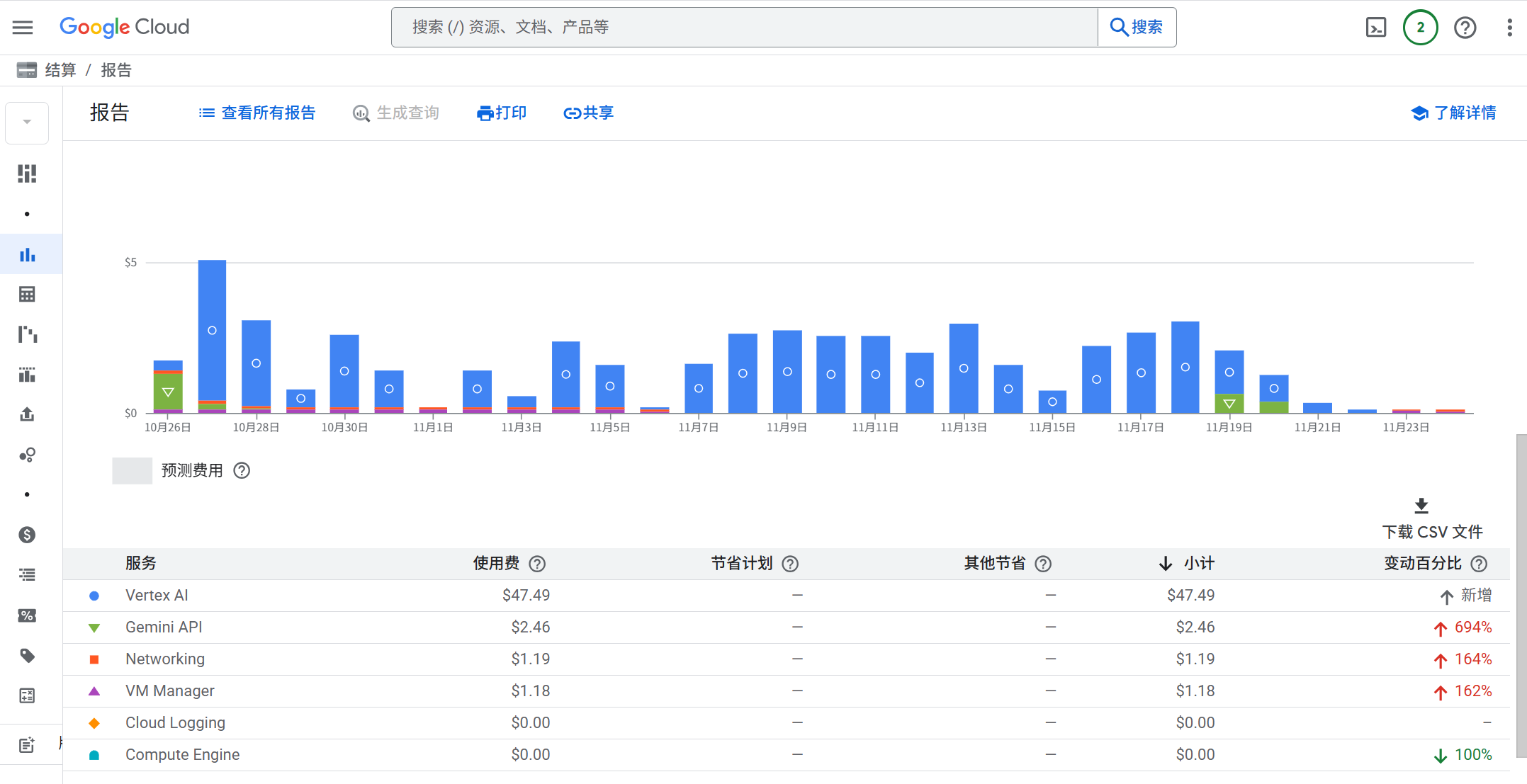
总体来说 2.5 pro 输入 1.25 $/M,输出 10 $/M。3-pro 价格有所上涨,输入到了 2 $/M。根据 google 的结算报告来看,在2-3人中度使用的情况下,1 天大概需要 2-3$。
| Model | Type | Price (/1M tokens) <= 200K input tokens | Price (/1M tokens) > 200K input tokens | Price (/1M tokens) <= 200K cached input tokens | Price (/1M tokens) > 200K cached input tokens | Price (/1M tokens) <= 200K input tokens with batch API | Price (/1M tokens) > 200K input tokens with batch API |
|---|---|---|---|---|---|---|---|
| Gemini 2.5 Pro | |||||||
| Input (text, image, video, audio) | $1.25 | $2.5 | $0.125 | $0.250 | $0.625 | $1.25 | |
| Text output (response and reasoning) | $10 | $15 | N/A | N/A | $5 | $7.5 | |
| Gemini 3 Pro Preview | |||||||
| Input (text, image, video, audio) | $2 | $4 | $0.2 | $0.4 | $1 | $2 | |
| Text output (response and reasoning) | $12 | $18 | N/A | N/A | $6 | $9 | |
| Image Output** | $120 | N/A | N/A | N/A | $60 | N/A |
OpenRouter 网页更容易看到模型价格信息对比。
Gemini 3 Pro Preview - API, Providers, Stats | OpenRouter
Open-WebUI
open-webui/open -webui: User-friendly AI Interface (Supports Ollama, OpenAI API, ...)
docker 部署 open-webui
- OPENAI_API_KEY 之后进入网页设置即可
version: '3.8'

services:
  open-webui:
    image: ghcr.io/open-webui/open-webui:main
    container_name: open-webui
    ports:
      - "3001:8080"
    environment:
      - OPENAI_API_KEY=your_secret_key
    volumes:
      - open-webui:/app/backend/data
    restart: unless-stopped
volumes:
  open-webui:
不同镜像版本
- open-webui:main
- 适合用于仅使用 openai api key 场景
- open-webui:main-slim
- For environments with limited storage or bandwidth, Open WebUI offers slim image variants that exclude pre-bundled models. These images are significantly smaller but download required models (whisper, embedding models) on first use.
- open-webui:ollama
- 继承了 ollama,支持 gpu 和 cpu
设置
此时已经可以在:管理员面板-》设置-》外部连接-》OpenAI 接口 中添加
- URL: https://generativelanguage.googleapis.com/v1beta/openai/
- 认证方式(密钥):API key
添加完成后,设置-》模型中可以看到所有模型
其它
- 支持从 excel 批量导入用户
函数
工具是外部的,函数是纯 python 脚本,运行在 open-webui 本地。
函数有几种
- pipeline
- 启用后,会出现在 model 下拉列表中
- filter
- 英文翻译
- action
- 修改 open-webui,增加按钮
(update 20251123) 使用 Google Gemini 函数完美支持 gemini
Google Gemini • Open WebUI Community https://github.com/owndev/Open-WebUI-Functions/blob/main/pipelines/google/google_gemini.py
- 直接在 open-webui 里用纯 python 实现了一个转换器,支持 Google AI API 和 Vertex AI API。
- 直接支持显示思维链
- 直接支持调用 nano banana 绘图
可以基本替代 LiteLLM 了
使用方法
- 安装函数后,点击函数设置(齿轮)
- 配置 google ai studio 的 API key
- 也支持 vertex ai API
- Gemini 模型出现在 model 下拉列表中
同一个作者还有两个 Tool 用于开启搜索功能,但是我测试没有成功。
- Grounding with Google search with google_search_tool.py filter
- Grounding with Vertex AI Search with vertex_ai_search_tool.py filter
LiteLLM
本质是一个 “适配器”或“代理层”
- 接收你的 OpenAI 格式请求。
- 将请求的结构翻译成 Gemini API 能理解的格式(例如,
"contents": [...])。 - 将你的
Gemini API Key添加到请求头中,发送给 Google AI Gemini API 的服务器。 - 收到 Gemini 的响应后,再翻译回 OpenAI 的格式返回给你。
对比直接使用 gemini 兼容 OpenAI 的 API key
google ai studio 提供了一个 兼容 OpenAI 的 API key,直接在 open-webui 中使用存在一些问题:
- 2.5 pro 无法联网搜索,和显示思维链。(2.5-flash 模型倒是两个都正常)
- litellm 可以设置 merge_reasoning_content_in_choices 参数,可以正常显示思维链。
docker 部署 litellm proxy server
litellm 还是一个 python SDK,但是我们主要使用其 proxy 服务器的用法。
Getting Started Tutorial | liteLLM
- 介绍了如何使用 litellm 请求 openai api 兼容的服务器
- 将 litellm 自身暴露成一个 openai api 兼容的服务器
- 设置的 master_key 就是 cherry-studio 等软件需要的 OpenAI API Key
docker compose 示例
litellm/docker-compose.yml at main · BerriAI/litellm
- 我将 prometheus 注释掉了,该服务只是不断监测服务是否在线。并提供一个数据面板。
services:
  litellm:
    build:
      context: .
      args:
        target: runtime
    image: ghcr.io/berriai/litellm:main-stable
    #########################################
    ## Uncomment these lines to start proxy with a config.yaml file ##
    volumes:
      - ./litellm_config.yaml:/app/config.yaml
      - ./vertex_ai_service_account.json:/app/vertex_ai_service_account.json
    command:
      - "--config=/app/config.yaml"
    ##############################################
    ports:
      - "3002:4000" # Map the container port to the host, change the host port if necessary
    environment:
      DATABASE_URL: "postgresql://llmproxy:dbpassword9090@db:5432/litellm"
      STORE_MODEL_IN_DB: "True" # allows adding models to proxy via UI
      GOOGLE_APPLICATION_CREDENTIALS: /app/vertex_ai_service_account.json
    env_file:
      - .env # Load local .env file
    depends_on:
      - db  # Indicates that this service depends on the 'db' service, ensuring 'db' starts first
    healthcheck:  # Defines the health check configuration for the container
      test: [ "CMD-SHELL", "wget --no-verbose --tries=1 http://localhost:4000/health/liveliness || exit 1" ]  # Command to execute for health check
      interval: 30s  # Perform health check every 30 seconds
      timeout: 10s   # Health check command times out after 10 seconds
      retries: 3     # Retry up to 3 times if health check fails
      start_period: 40s  # Wait 40 seconds after container start before beginning health checks

  db:
    image: postgres:16
    restart: always
    container_name: litellm_db
    environment:
      POSTGRES_DB: litellm
      POSTGRES_USER: llmproxy
      POSTGRES_PASSWORD: dbpassword9090
    ports:
      - "5432:5432"
    volumes:
      - postgres_data:/var/lib/postgresql/data # Persists Postgres data across container restarts
    healthcheck:
      test: ["CMD-SHELL", "pg_isready -d litellm -U llmproxy"]
      interval: 1s
      timeout: 5s
      retries: 10

#  prometheus:
#    image: prom/prometheus
#    volumes:
#      - prometheus_data:/prometheus
#      - ./prometheus.yml:/etc/prometheus/prometheus.yml
#    ports:
#      - "9095:9090"
#    command:
#      - "--config.file=/etc/prometheus/prometheus.yml"
#      - "--storage.tsdb.path=/prometheus"
#      - "--storage.tsdb.retention.time=15d"
#    restart: always
volumes:
  prometheus_data:
    driver: local
  postgres_data:
    name: litellm_postgres_data # Named volume for Postgres data persistence
基本配置
修改 API key
修改 API key:Rotating Master Key | liteLLM
通过 google ai studio api key 使用 gemini
gemini 显示 thinking
gemini/google ai studio 和 vertex 需要启用选项
thinking: {"type": "enabled", "budget_tokens": 1024}  # budget_tokens: 1024-32768
merge_reasoning_content_in_choices: true
启用联网搜索
- litellm 配置中开启了
web_search_options: search_context_size: "medium"可以使用搜索
启用搜索也是要收费的,收费标准:Vertex AI Pricing | Google Cloud
- 2.0/2.5 Flash: 1500/天 免费
- 2.5pro:10000 次/天 免费
- 超出:35$/1000条
你不能依赖 Open-WebUI 的“网络搜索”按钮,因为它发送的参数可能不是 Vertex AI 所期望的 google_search_retrieval 工具。最稳定、最可靠的方法是在 LiteLLM 的配置中创建一个专门用于搜索的“虚拟模型”。
通过 vertex ai 使用 gemini
在 google ai studio 有免费的 gemini2.5/3 额度时,经常遇到 server overload 的报错,需要过一会儿才能使用。但我明明是付费用户,使用也没有达到使用速率限制。对比感觉使用 vertex ai 更稳定些。
如何获得 service_account.json 需要参考 google cloud 文档或者直接问LLM。
litellm_config.yaml
model_list:
  - model_name: gemini-2.5-pro
    litellm_params:
      model: vertex_ai/gemini-2.5-pro
      vertex_project: "project-id"
      vertex_location: "us-central1"
      vertex_credentials: "/path/to/service_account.json" # [OPTIONAL] Do this OR `!gcloud auth application-default login` - run this to add vertex credentials to your env
docker-compose.yaml 文件中,添加了文件映射和环境变量。
volumes:
      - ./litellm_config.yaml:/app/config.yaml
      - ./vertex_ai_service_account.json:/app/vertex_ai_service_account.json
environment:
      GOOGLE_APPLICATION_CREDENTIALS: /app/vertex_ai_service_account.json
使用 gemini-3-pro 404
啊哦!回复有问题 litellm.ServiceUnavailableError: litellm.MidStreamFallbackError: litellm.NotFoundError: Vertex_ai_betaException - b'{\n "error": {\n "code": 404,\n "message": "Publisher Model `projects/axiomatic-spark-475316-e7/locations/us-central1/publishers/google/models/gemini-3-pro-preview` was not found or your project does not have access to it. Please ensure you are using a valid model version. For more information, see: https://cloud.google.com/vertex-ai/generative-ai/docs/learn/model-versions",\n "status": "NOT_FOUND"\n }\n}\n'. Received Model Group=vertex_ai/gemini-3-pro-preview Available Model Group Fallbacks=None
需要将 vertex_location 设置为 global https://github.com/BerriAI/litellm/issues/16780#issuecomment-3568703439
使用其它兼容 OpenAI API 的模型
其实最简单。兼容 openai 的 API key,直接设置 api_base 和 api_key 即可。
model_list:
 - model_name: siliconflow/deepseek-ai/DeepSeek-V3.2
    litellm_params:
      model: openai/deepseek-ai/DeepSeek-V3.2
      api_base: https://api.siliconflow.cn/v1
      api_key: os.environ/SILICONFLOW_API_KEY
需要在model 前面添加 openai,否则 litellm 不知道 provider 是谁。
08:29:06 - LiteLLM Router:ERROR: router.py:5157 - Error creating deployment: litellm.BadRequestError: LLM Provider NOT provided. Pass in the LLM provider you are trying to call. You passed model=deepseek-ai/DeepSeek-V3.2
 Pass model as E.g. For 'Huggingface' inference endpoints pass in `completion(model='huggingface/starcoder',..)` Learn more: https://docs.litellm.ai/docs/providers, ignoring and continuing with other deployments.
Traceback (most recent call last)
其它 TODO
OpenAPI/New API 貌似功能比 LiteLLM 更多
- songquanpeng/one-api: LLM API 管理 & 分发系统,支持 OpenAI、Azure、Anthropic Claude、Google Gemini、DeepSeek、字节豆包、ChatGLM、文心一言、讯飞星火、通义千问、360 智脑、腾讯混元等主流模型,统一 API 适配,可用于 key 管理与二次分发。单可执行文件,提供 Docker 镜像,一键部署,开箱即用。LLM API management & key redistribution system, unifying multiple providers under a single API. Single binary, Docker-ready, with an English UI.
- QuantumNous/new-api: AI模型聚合管理中转分发系统,一个应用管理您的所有AI模型,支持将多种大模型转为统一格式调用,支持OpenAI、Claude、Gemini等格式,可供个人或者企业内部管理与分发渠道使用。🍥 The next-generation LLM gateway and AI asset management system supports multiple languages.
- feat: support claude and gemini in vertex ai by vaayne · Pull Request #1621 · songquanpeng/one-api