git
git
高级
- 从一个节点产生多个分支,能否 rebase 新的 cm 到该节点?
checkout
回退指定目录下的文件
git checkout abc1234 -- /path/to/dir

# 此时该目录的旧版本文件已经进入暂存区(Staged),直接提交即可
git commit -m "Revert changes in /path/to/dir"
reset
reset --soft, --mixed, --hard
修改的不同阶段:
- in working directory:
- index / stagged:通过 git add
- commited:进入版本控制,commited 的修改总能找回来。
--soft B:将 C 的修改恢复到 index 中 --mixed B:将 C 的修改恢复到 working directory 中 --hard B:index 被修改为 B,working directory 清空
git co 和 git reset --mixed 效果类似,都能保留当前 working directory,同时还能保留 git log。
reset 后恢复 reflog
rebase
Q: git X 分支有 A, B, C 三个提交,Y 分支有 A, B2, C2 提交,如何将 X 分支 rebase 到 B2。其中 B 和 B2 存在冲突
rebase 会自动找到共同祖先 A,并尝试把 B 和 C “搬运”到 B2 后面。
merge
no-ff
git 有没有办法直接指定两个 commit(可能位于两个分支,或者一个分支但是间隔了很远),然后创建一个 merge 提交,从而对比两个commit 有哪些改动
这里的关键是--no-ff(No Fast-forward),它强制生成一个新的 Merge Commit 节点,即使两个提交是线性关系。
no-commit
告诉 Git 完成合并逻辑并把结果放到暂存区(Staging Area),但不要自动创建 commit。 此时,Git 会停下来。你可以像平时开发一样修改代码、调整配置文件或者删除不需要的文件。pull
直接使用git pull拉取代码,被同事狠狠地diss了! - 知乎
gitpull--ff-onlywill only do "fast-forward" updates: it fails if your local branch has diverged from the remote branch. This is the default.gitpull--rebaserunsgitrebasegitpull--no-rebaserunsgitmerge.gitpull--squashrunsgitmerge--squash
Refspec(手动设置 fetch 分支)
clone 仓库时指定了 depth = 1, branch = dev/distributed,后面 git fetch origin 无法获取其他分支
解决方法
0 单次 fetch
不推荐,之后 git pull 仍然无法正常使用
# 语法:git fetch <remote> <source_branch>:<destination_remote_tracking_branch>
git fetch origin dev_4_9_2:refs/remotes/origin/dev_4_9_2
取消浅层克隆
如果你不想下载所有历史,想开始跟踪其他分支
1 set-branches
2 手动修改 .git/config
你可以手动修改 .git/config 文件
[remote "origin"]
fetch = +refs/heads/dev/distributed:refs/remotes/origin/dev/distributed
fetch = +refs/heads/dev_4_9_2:refs/remotes/origin/dev_4_9_2
#fetch = +refs/heads/*:refs/remotes/origin/*
重名/删除 refs
删除 refs/remotes/ 下非 remote 仓库的 refs
#!/bin/bash

# 获取所有已配置的远程仓库名称 (例如: "origin", "local")
remotes=$(git remote)
echo "发现有效的远程仓库: $remotes"
echo "--- 开始查找并删除位置错误的远程引用 ---"

# 遍历 'refs/remotes/'下的所有引用
git for-each-ref refs/remotes/ | while read -r _ _ ref; do
    # 截取掉 "refs/remotes/" 前缀,得到类似 "dev/distributed" 或 "origin/main" 的短名称
    short_ref=${ref#refs/remotes/}

    # 设置一个标记,判断当前引用是否属于一个已知的远程仓库
    is_valid_remote_ref=false

    # 检查短名称是否以 "[remote_name]/" 的形式开头
    for remote in $remotes; do
        if [[ "$short_ref" == "$remote/"* ]]; then
            is_valid_remote_ref=true
            break
        fi
    done

    # 如果引用不属于任何已知远程仓库,那它就是我们要删除的错误引用
    if ! $is_valid_remote_ref; then
        echo "正在删除错误引用: $ref"
        git update-ref -d "$ref"
    fi
done

echo "--- 清理完成 ---"
基础
branch
查看分支 upstream
设置 upstream
重命名
remote
- 可以查看仓库的 fetch url 和 push url
- origin/HEAD,表示仓库的默认分支(用于 git clone 等)
- 远程仓库的分支
- 本地仓库配置了 git push 的分支
tag
#显示所有tag
git tag
#显示具体tag信息
git show v1.2
#添加tag
git tag v1.2 9fceb02 -a
git tag v1.2 9fceb02 -a -m "my tag"
#删除tag
git tag -d v1.2
#推送tag到远程
git push origin --tags
小技巧
查找某个 commit 并显示修改
-i忽略大小写- --all 查找所有分支
--stat仅显示修改了哪些文件
shallow clone
避免 clone 的仓库太大,将 git commit 记录截断。
man git-clone
Create a shallow clone with a history truncated to the specified number of commits. Implies --single-branch unless --no-single-branch is given to fetch the histories near the tips of all branches. If you want to clone submodules shallowly, also pass shallow-submodules.
代码统计
Git统计代码量和常用命令 - lovezj9012 - 博客园 统计每个人的增删行数
git log --format='%aN' | sort -u | while read name; do echo -en "$name\t"; git log --author="$name" --pretty=tformat: --numstat | awk '{ add += $1; subs += $2; loc += $1 - $2 } END { printf "added lines: %s, removed lines: %s, total lines: %s ", add, subs, loc }' -; done
根据时间段排除文件夹统计
git log --since=2021-01-28 --until=2021-02-03 --pretty=tformat: --numstat -- . ":(exclude)src/test" | awk '{ add += $1; subs += $2; loc += $1 + $2 } END { printf "added lines: %s, removed lines: %s, total lines: %s\n", add, subs, loc }'
-- . ":(exclude)folderName" folderName指src/test文件夹,这里是相对路径 -- . ":(exclude)folderName1" ":(exclude)folderName2" 排除多个文件夹 -- . ":(exclude)folderName"也 可以用在其他的统计中;--前只能有一个空格,有多个空格识别不了
移动非当前分支到某个 commit
cherry-pick
Q: git 分支 B 想要获得分支 A 上除了某一次提交外的其他5-6个提交,有什么简单的方法。分支 A 和 B 从某个点 C 分叉
Cherry-pick 范围选择
清除远程已删除的分支
clean untrack 文件
有时候 git reset 后,会有大量 untrack 的文件
-n或--dry-run参数来进行演习-f或--force:这是强制执行的意思。如果没有这个参数,Git 不会真的删除文件,而是会提示您使用-f来确认。这是一个安全措施,防止您意外删除重要文件。-d:这个参数表示连同未被追踪的目录一起删除。如果您只想删除文件而不删除目录,可以省略这个参数。
代理
查看详细信息
GIT_TRACE=1git --verbose <cmd>
http 和 https 设置代理
ssh 代理
windows
windows 下没有 nc 命令,需要 connect.exe(可以下载.c 文件编译成 exe 文件)
SSH in git behind proxy on windows 7 - Stack Overflow
遇到的问题
unsafe directory
git - Fatal error "unsafe repository ('/home/repon' is owned by someone else)" - Stack Overflow
git version > Git 2.36
git config --global --add safe.directory '*'
curl 92 HTTP/2 stream 0 was not closed cleanly: CANCEL (err 8)
➜  repo git clone https://github.com/YaoFANGUK/video-subtitle-generator
Cloning into 'video-subtitle-generator'...
remote: Enumerating objects: 434, done.
remote: Counting objects: 100% (95/95), done.
remote: Compressing objects: 100% (53/53), done.
error: RPC failed; curl 92 HTTP/2 stream 0 was not closed cleanly: CANCEL (err 8)
error: 503 bytes of body are still expected
fetch-pack: unexpected disconnect while reading sideband packet
fatal: early EOF
fatal: fetch-pack: invalid index-pack output
成功
➜  repo git clone https://github.com/YaoFANGUK/video-subtitle-generator
Cloning into 'video-subtitle-generator'...
remote: Enumerating objects: 434, done.
remote: Counting objects: 100% (95/95), done.
remote: Compressing objects: 100% (53/53), done.
remote: Total 434 (delta 46), reused 87 (delta 42), pack-reused 339
Receiving objects: 100% (434/434), 5.92 GiB | 21.39 MiB/s, done.
Resolving deltas: 100% (149/149), done.
Updating files: 100% (151/151), done.
貌似修改 buffer 也可以:GIT 推送错误 error: RPC failed;curl 92 HTTP/2 stream 0 was not closed cleanly: CANCEL (err 8) - 郭小睿 - 博客园 (cnblogs.com)
git cherry-pick allow empty
根据图片显示的信息,"the previous cherry-pick is now empty" 这句话表示之前的 cherry-pick 操作最终没有引入任何实际文件变更。这种情况通常出现在处理代码冲突时,以下是具体解析:
坚持提交空操作(如需保留提交记录)
放弃空操作并继续
- 完全跳过此次无效的cherry-pick
- 推荐选择,避免污染提交历史
patch 补丁
diff, patch 工具
我对 A 文件进行了一些修改得到 B,现在 A 发生了变化,我如何将修改作用在新的 A 上
diff -u A B > A.patch

patch A_new --merge -o B_new < A.patch
patch A_new --merge -o B_new -i A.patch
-i: 指定 patch 文件,而不是从 stdin 读入-o:patched 后的文件路径--merge: 将冲突部分写入输出文件(使用 conflict marker),而不是创建单独的 reject 文件- conflict 标记就是 git 格式,vscode 中对其会可视化显示
git format-patch
Git 打补丁-- patch 和 diff 的使用(详细) - 掘金 (juejin.cn)
Git 提供了两种补丁方案,一是用 git diff 生成的 UNIX 标准补丁.diff 文件,二是 git format-patch 生成的 Git 专用.patch 文件。 .diff 文件只是记录文件改变的内容,不带有 commit 记录信息,多个 commit 可以合并成一个 diff 文件。 .patch 文件带有记录文件改变的内容,也带有 commit 记录信息,每个 commit 对应一个 patch 文件。
git format-patch HEAD^  # 最新的一次 commit(上一次到现在的 commit)
git format-patch 【commit sha1 id】..【commit sha1 id】 # 某两次提交之间的所有patch
-o: If -o is specified, output files are created in dir. Otherwise they are created in the current working directory-n: -n, --numbered Name output in [PATCH n/m] format, even with a single patch.
git diff 相关
git diff 【commit sha1 id】 【commit sha1 id】 > 【diff文件名】
git diff --no-index file1 file2 # 非git repo下,生成两个文件diff
format-patch
Git - git-format-patch Documentation (git-scm.com)
git format-patch HEAD^  # 最新的一次 commit(上一次到现在的 commit)
git format-patch 【commit sha1 id】..【commit sha1 id】 # 某两次提交之间的所有patch
应用 patch
submodule
可以本地添加 submodule
添加 submodule 后会生成.gitmodules文件
[submodule "third-party/gpu-rodinia"]
        path = third-party/gpu-rodinia
        url = ./third-party/gpu-rodinia
[submodule "third-party/nvbit_release"]
        path = third-party/nvbit_release
        url = ./third-party/nvbit_release
[submodule "third-party/cuda-samples"]
        path = third-party/cuda-samples
        url = ./third-party/cuda-samples
[submodule "third-party/gpu-parboil"]
        path = third-party/gpu-parboil
        url = ./third-party/gpu-parboil
clone submodule
clone 时默认是不会 clone 子模块的,需要添加 recursive。-j8 表示使用多线程下载。
会从.gitmodules中指定的 url 中 clone 仓库,然后 checkout 到对应 commit。如果是本地 commit,没有推送到远程,则会因为没有对应 commit 而报错。解决方法是改用本地仓库作为 url。
git submodule init
git submodule update

# 合并成一个
git submodule update --init --recursive
git submodule update --init --recursive --depth 1
file not allowed 问题
Submodule 'third-party/cuda-samples' (/staff/fyyuan/repo/gpu-analysis-model/third-party/cuda-samples) registered for path 'third-party/cuda-samples'

Cloning into '/staff/fyyuan/repo/gpu-analysis-model-70/third-party/cuda-samples'...
fatal: transport 'file' not allowed
解决方法
LFS
参考
使用方法
- 执行 track 命令建立跟踪
1. 实际修改了
.gitattribute文件,需要 git add 提交git commit -m "Add \"*.bigfile\" LFS config "
- 新建 .bigfile 文件,然后 git add 1. git 实际创建 Git LFS Pointer 文件,包含
本地的Git LFS文件是如何存储的
- LFS缓存目录
- 名称被改为 oid(Git LFS object id)
$tree .git/lfs
.git/lfs
├── objects
│    └── 49
│         └── bc
│             └── 49bc20df15e412a64472421e13fe86ff1c5165e18b2afccf160d4dc19fe68a14
└── tmp
4 directories, 1 file
撤销LFS跟踪并使用Git管理
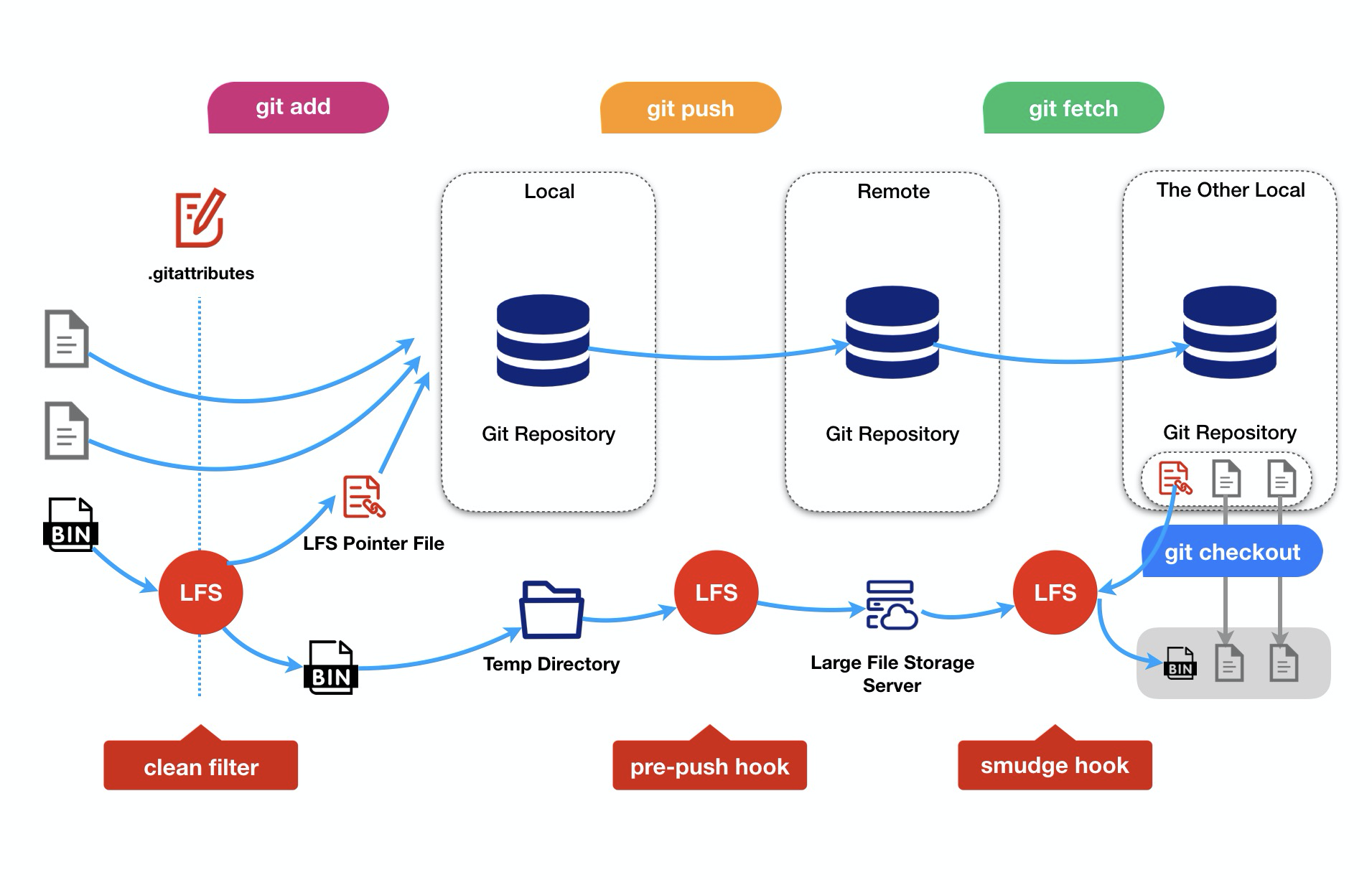
Git LFS处理流程